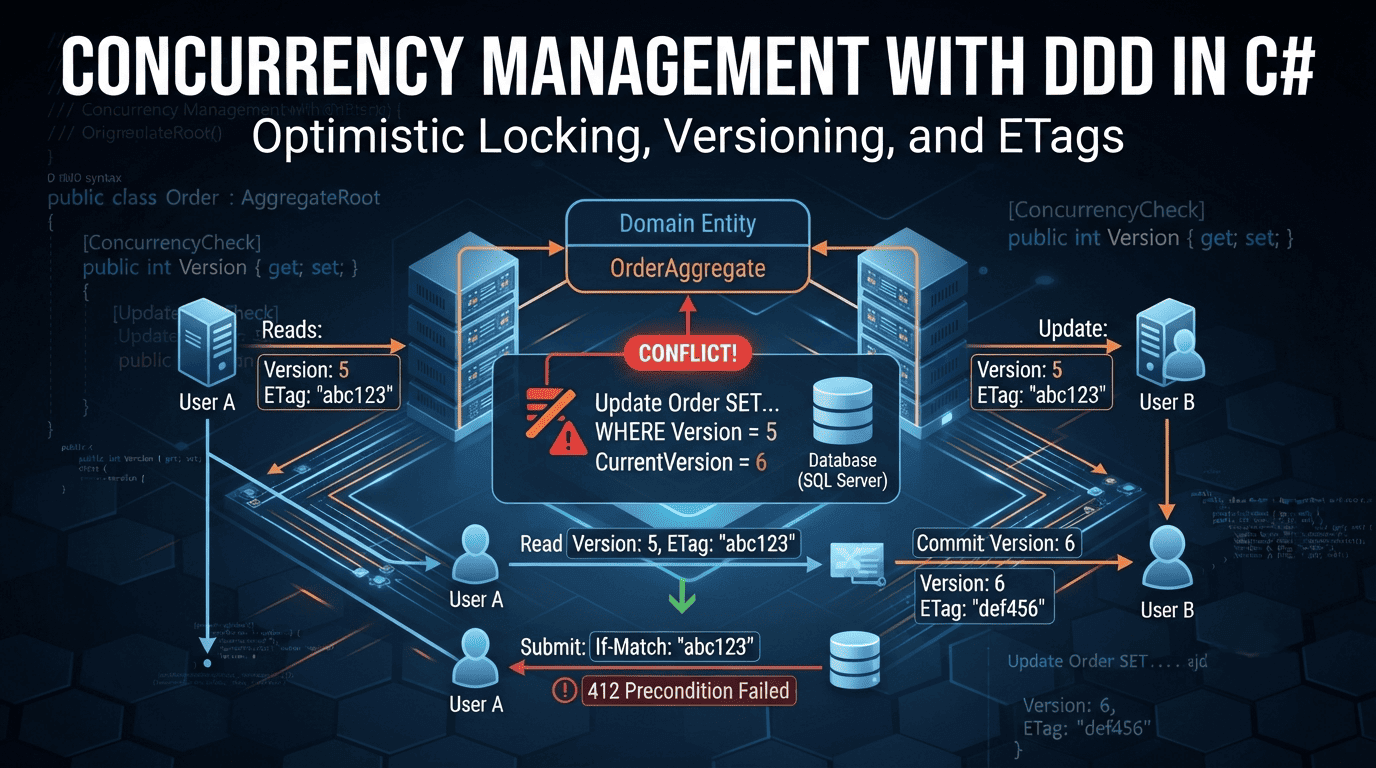
Concurrency is inevitable when multiple users or services change the same data. In Domain-Driven Design, we protect invariants inside an Aggregate boundary and use optimistic concurrency to avoid lost updates without resorting to database locks. This post shows practical C# patterns with EF Core and ASP.NET Core.
Key ideas
- Aggregates are the consistency boundary; only one transaction updates a single aggregate instance at a time.
- Prefer optimistic concurrency: we detect conflicts and retry or surface a 409 Conflict.
- Use a version (RowVersion/ETag) per aggregate for conflict detection.
- Keep commands idempotent and side effects transactional (consider the Outbox pattern for integration events).
Pattern 1 — Aggregate versioning with EF Core RowVersion
RowVersion (a byte[] concurrency token) is a simple, reliable concurrency token that EF Core understands out of the box.
How RowVersion Works Under the Hood
RowVersion is not a timestamp despite the deprecated TIMESTAMP alias. It is an 8-byte binary value that SQL Server automatically increments whenever any column in the row changes.
| Property | Description |
|---|---|
| Storage | 8 bytes (BINARY(8)) |
| Uniqueness | Database-wide, not per table |
| Generation | Automatic on INSERT and UPDATE |
| Control | SQL Server manages it; your application never sets it |
| Checking current value | SELECT @@DBTS returns the database-wide timestamp counter |
Every database has a single monotonically increasing counter. Each time any row in any table is modified, SQL Server increments this counter and writes the new value into the row’s RowVersion column. The value is not a date or time — it is a sequential binary number that tracks relative time within a database. SQL Server ignores any value you provide for RowVersion columns; the database assigns the value automatically.
When you call SaveChanges(), EF Core generates an UPDATE statement that includes the original RowVersion in the WHERE clause:
-- EF Core generated SQL:
UPDATE [Orders]
SET [Status] = @p0, [CustomerId] = @p1
WHERE [Id] = @p2 AND [RowVersion] = @p3;

-- If @@ROWCOUNT = 0, another session modified the row → conflict
-- If @@ROWCOUNT = 1, update succeeded
This is the core of optimistic concurrency: the database atomically checks whether the row has changed since it was read, and rejects the update if it has.
PostgreSQL equivalent: PostgreSQL uses xmin (the transaction ID of the inserting/updating transaction) as its built-in concurrency token. This is a hidden system column so no extra column is needed in the table. You can map a uint property to the PostgreSQL xmin system column using the standard EF Core mechanisms:
public class Order
{
    public int Id { get; set; }
    public uint Version { get; set; }
}
// PostgreSQL exposes xmin through the standard concurrency token mechanism.
modelBuilder.Entity<Order>()
    .Property(o => o.Version)
    .IsRowVersion();
SQLite: SQLite has no native concurrency token type. You must manage a Version integer column entirely in application code or via triggers.
Note: A RowVersion value changes even if the UPDATE sets a column to the same value it already holds. Any UPDATE statement at all increments the counter. Keep this in mind when writing bulk or no-op updates.
// Domain model (simplified)
public class Order // Aggregate Root
{
    public Guid Id { get; private set; }
    public Guid CustomerId { get; private set; }
    public string Status { get; private set; } = "Draft";
    private readonly List<OrderLine> _lines = new();
    public IReadOnlyCollection<OrderLine> Lines => _lines.AsReadOnly();

    // Concurrency token (EF Core)
    public byte[] RowVersion { get; private set; } = Array.Empty<byte>();

    public void AddLine(Guid productId, int quantity, decimal unitPrice)
    {
        if (quantity <= 0) throw new ArgumentOutOfRangeException(nameof(quantity));
        _lines.Add(new OrderLine(productId, quantity, unitPrice));
    }

    public void Submit()
    {
        if (!_lines.Any()) throw new InvalidOperationException("Cannot submit an empty order.");
        Status = "Submitted";
    }
}

public record OrderLine(Guid ProductId, int Quantity, decimal UnitPrice);
EF Core configuration with a RowVersion concurrency token:
public sealed class OrderingDbContext : DbContext
{
    public DbSet<Order> Orders => Set<Order>();

    protected override void OnModelCreating(ModelBuilder modelBuilder)
    {
        var order = modelBuilder.Entity<Order>();
        order.HasKey(o => o.Id);
        order.Property(o => o.RowVersion)
             .IsRowVersion() // marks as concurrency token
             .IsRequired();
        order.OwnsMany(o => o.Lines, b =>
        {
            b.WithOwner();
            b.Property<int>("Id");
            b.HasKey("Id");
        });
    }
}
Repository save with conflict detection and a clean domain error:
public class OrdersRepository
{
    private readonly OrderingDbContext _db;
    public OrdersRepository(OrderingDbContext db) => _db = db;

    public async Task SaveAsync(Order order, CancellationToken ct = default)
    {
        try
        {
            await _db.SaveChangesAsync(ct);
        }
        catch (DbUpdateConcurrencyException ex)
        {
            throw new ConcurrencyException("Order was modified by another process.", ex);
        }
    }
}

public sealed class ConcurrencyException : Exception
{
    public ConcurrencyException(string message, Exception? inner = null) : base(message, inner) {}
}
How DbUpdateConcurrencyException Is Thrown
When SaveChanges() executes, EF Core checks the number of rows affected by each UPDATE or DELETE statement. If zero rows are affected for a tracked entity that has a concurrency token, EF Core throws DbUpdateConcurrencyException.
The generated SQL looks like this:
-- Step 1: UPDATE with concurrency check
SET NOCOUNT ON;
UPDATE [Orders]
SET [Status] = @p0
WHERE [Id] = @p1 AND [RowVersion] = @p2;

-- Step 2: Check affected rows
SELECT [RowVersion]
FROM [Orders]
WHERE @@ROWCOUNT = 1 AND [Id] = @p1;

-- If @@ROWCOUNT = 0 → DbUpdateConcurrencyException
The exception’s Entries property contains the affected entities. You can inspect them to retrieve the current database values and compare with the client’s intended changes:
catch (DbUpdateConcurrencyException ex)
{
    foreach (var entry in ex.Entries)
    {
        var clientValues = (Order)entry.Entity;
        var databaseValues = await entry.GetDatabaseValuesAsync();

        if (databaseValues == null)
        {
            // Row was deleted by another user between read and write
            Console.WriteLine("The order was deleted by another user.");
        }
        else
        {
            // Row was modified — show differences to the user
            var currentStatus = databaseValues.GetValue<string>(nameof(Order.Status));
            var attemptedStatus = clientValues.Status;
            Console.WriteLine($"Status was '{currentStatus}', you attempted to set it to '{attemptedStatus}'");
        }
    }
}
Important: After catching DbUpdateConcurrencyException, the EF Core change tracker’s cached values are stale — the entity’s RowVersion in the tracker still has the old value. Before retrying, you must either call entry.Reload(), detach the entity and re-query, or create a new DbContext instance. Retrying with the stale tracked entity will fail again because EF Core will use the same old RowVersion in the WHERE clause.
Pattern 2 — Retry policy on concurrency with backoff
After detecting a conflict, reload the latest aggregate state, re-apply the command, and retry. Keep retries bounded and fast.
Polly is the de-facto resilience library for .NET. It provides strategies for handling transient faults — Retry, Circuit Breaker, Timeout, Fallback, Rate Limiter, and Hedging — in a fluent, thread-safe API. For concurrency management, the two most relevant strategies are:
| Strategy | Purpose |
|---|---|
| Retry | Re-execute a failed operation after a delay. Use for transient conflicts (e.g., optimistic concurrency exceptions). |
| Circuit Breaker | Stop executing when failures exceed a threshold. Use to protect downstream systems from cascading failures. |
using Polly;
using Polly.Retry;

public sealed class SubmitOrderHandler
{
    private readonly OrdersRepository _repo;
    private readonly OrderingDbContext _db;
    private static readonly ResiliencePipeline Retry = new ResiliencePipelineBuilder()
        .AddRetry(new RetryStrategyOptions
        {
            MaxRetryAttempts = 3,
            Delay = TimeSpan.FromMilliseconds(50),
            BackoffType = DelayBackoffType.Exponential,
            ShouldHandle = new PredicateBuilder().Handle<ConcurrencyException>(),
        })
        .Build();

    public SubmitOrderHandler(OrdersRepository repo, OrderingDbContext db)
    {
        _repo = repo; _db = db;
    }

    public Task HandleAsync(Guid orderId, CancellationToken ct)
        => Retry.ExecuteAsync(async _ =>
        {
            var order = await _db.Orders.Include(o => o.Lines).FirstAsync(o => o.Id == orderId, ct);
            order.Submit();
            await _repo.SaveAsync(order, ct);
        }, ct);
}
Notes:
- Do not retry unboundedly.
- Commands must be idempotent or validated to avoid duplicate effects across retries.
Why Wait and Retry?
When two transactions conflict, one succeeds and one fails. The failed transaction needs to reload the latest state and re-apply its changes. But it should not retry immediately — it should wait briefly so the winning transaction has time to fully commit and release any internal locks.
- Transient failures are normal — In distributed systems, brief conflicts happen frequently and are usually resolved by the next attempt.
- Reduces contention — Waiting gives the conflicting transaction time to complete, so the retry encounters fresh data.
- Prevents thundering herd — Without waiting, all clients that failed at the same moment retry at the same time, creating a synchronized wave that can overwhelm the database.
Exponential Backoff with Jitter
The retry policy uses exponential backoff: each retry waits longer than the previous one.
Attempt 1: Wait  50ms
Attempt 2: Wait 100ms
Attempt 3: Wait 200ms
Jitter adds randomness to prevent synchronized retries. Without jitter, all clients that failed at time T retry at exactly T + backoff, creating a spike of correlated load.
| Jitter Type | Formula | Description |
|---|---|---|
| Full Jitter | random(0, base × 2^attempt) | Spreads retries uniformly across the window. Recommended default. |
| Equal Jitter | (base × 2^attempt) / 2 + random(0, (base × 2^attempt) / 2) | Guarantees a meaningful minimum wait. Good for payment APIs. |
| Decorrelated | random(base, prev_delay × 3) | Widens spread on each retry. Useful under high concurrency. |
Full jitter is the simplest and most effective. AWS uses it as the default in most of its SDKs. The key idea: instead of all clients retrying at exactly 1s, 2s, 4s, and 8s, each client picks a random time within that window, spreading the load smoothly.
Do Not Retry Unboundedly
Retrying infinitely is dangerous:
| Risk | Description |
|---|---|
| Resource exhaustion | Memory, threads, and database connections are consumed by waiting requests |
| Thundering herd amplification | Retries add load to a system already struggling under contention |
| Metastable failure | The system cannot recover because retries keep the load high |
| Poor user experience | Requests hang indefinitely with no feedback |
Best practice: Cap retries at 3–5 attempts, use circuit breakers for systemic failures, and fail fast when conflicts indicate a real business problem (e.g., a product is out of stock). For interactive requests, a total timeout of 5–10 seconds is reasonable; for background jobs, you can afford more.
Pattern 3 — ETags for HTTP write concurrency
Expose the aggregate RowVersion as an HTTP ETag. Require If-Match for updates to prevent lost writes.
[ApiController]
[Route("api/orders")]
public class OrdersController : ControllerBase
{
    private readonly OrderingDbContext _db;
    private readonly OrdersRepository _repo;

    public OrdersController(OrderingDbContext db, OrdersRepository repo)
    {
        _db = db;
        _repo = repo;
    }

    [HttpGet("{id}")]
    public async Task<IActionResult> Get(Guid id, CancellationToken ct)
    {
        var order = await _db.Orders.Include(o => o.Lines).FirstOrDefaultAsync(o => o.Id == id, ct);
        if (order is null) return NotFound();
        Response.Headers.ETag = $"\"{Convert.ToBase64String(order.RowVersion)}\""; // quoted per RFC
        return Ok(order);
    }

    [HttpPut("{id}/submit")]
    public async Task<IActionResult> Submit(Guid id, CancellationToken ct)
    {
        if (!Request.Headers.TryGetValue("If-Match", out var etagHeader))
            return StatusCode(StatusCodes.Status428PreconditionRequired, "If-Match header required");

        var expected = ParseEtag(etagHeader!);
        var order = await _db.Orders.Include(o => o.Lines).FirstOrDefaultAsync(o => o.Id == id, ct);
        if (order is null) return NotFound();

        // Compare expected RowVersion with current
        if (!order.RowVersion.AsSpan().SequenceEqual(expected))
            return StatusCode(StatusCodes.Status412PreconditionFailed);

        order.Submit();
        try
        {
            await _repo.SaveAsync(order, ct);
            return NoContent();
        }
        catch (ConcurrencyException)
        {
            return Conflict(); // 409
        }

        static byte[] ParseEtag(string etag)
        {
            var trimmed = etag.Trim('"');
            return Convert.FromBase64String(trimmed);
        }
    }
}
Why Require If-Match?
Without If-Match, clients can silently overwrite each other’s changes (the “lost update” problem described in RFC 7232):
Timeline WITHOUT If-Match (lost update):
1. Client A reads Order (RowVersion = 1)
2. Client B reads Order (RowVersion = 1)
3. Client A updates status → succeeds (RowVersion becomes 2)
4. Client B updates price  → also succeeds (overwrites Client A's status change!)
   Client A's change is silently lost.
With If-Match, the server rejects stale updates before any data is written:
Timeline WITH If-Match:
1. Client A reads Order (RowVersion = 1), receives ETag "v1"
2. Client B reads Order (RowVersion = 1), receives ETag "v1"
3. Client A updates with If-Match: "v1" → succeeds (RowVersion becomes 2)
4. Client B updates with If-Match: "v1" → 412 Precondition Failed
   Client B is notified and can refetch, merge, and retry.
HTTP Status Codes for Concurrency
| Status Code | Name | When to Return | Client Action |
|---|---|---|---|
| 428 | Precondition Required | Client did not send an If-Match header | GET the resource, obtain the current ETag, retry the request with If-Match |
| 412 | Precondition Failed | The ETag in If-Match does not match the current resource version | GET the resource again, see what changed, decide whether to merge or overwrite, retry with fresh ETag |
| 409 | Conflict | A business-logic conflict occurred (e.g., invalid state transition, duplicate entry) independent of conditional headers | Resolve the domain conflict, then retry if still valid |
428 vs 412: The 428 tells the client “you forgot to participate in optimistic concurrency” and teaches it the read-then-write pattern. The 412 tells the client “your version is stale — someone else edited this resource since you last read it.” An API that fully implements optimistic locking uses both together: new or naive clients learn the pattern from 428, while well-behaved clients get 412 when a race occurs.
412 vs 409: The 412 is tied to explicit HTTP precondition headers (If-Match, If-Unmodified-Since). The 409 is a broader signal for application-level conflicts that are not expressed as conditional headers. Use 412 for version/stale-ETag failures. Use 409 for business-rule violations (e.g., cannot cancel a shipped order).
RFC References
| RFC | Defines | Relevance |
|---|---|---|
| RFC 6585 | 428 Precondition Required | “Its typical use is to avoid the ’lost update’ problem” — server requires the request to be conditional |
| RFC 7232 | If-Match header | Conditional requests for optimistic concurrency; strong ETag comparison required |
| RFC 9110 | 412 Precondition Failed | “One or more conditions given in the request header fields evaluated to false” |
Client-Side Response Guide
When a client receives a concurrency status code, it should follow this decision tree:
Client sends PUT/PATCH with If-Match
│
├─ 2xx Success → Update local ETag from response header
│
├─ 428 Precondition Required
│  → Client forgot If-Match header
│  → GET the resource, store ETag, retry with If-Match
│
├─ 412 Precondition Failed
│  → ETag is stale (another client updated the resource)
│  → GET the resource, compare local changes with server state
│  ├─ Changes are compatible → merge and retry with new ETag
│  └─ Changes conflict → present conflict to user for resolution
│
├─ 409 Conflict
│  → Business-level conflict (not a version mismatch)
│  → Read error body for details, resolve domain issue, retry if valid
│
└─ 5xx Server Error
   → Transient failure
   → Retry with exponential backoff
Pattern 4 — Using an integer Version instead of RowVersion
If you prefer an integer, configure it as a concurrency token. EF Core will include it in the WHERE clause when updating.
Data Annotations:
public class Product
{
    public Guid Id { get; private set; }
    public string Name { get; private set; } = string.Empty;

    [ConcurrencyCheck]
    public int Version { get; private set; }

    public void Rename(string name)
    {
        Name = name;
    }
}
Fluent API:
protected override void OnModelCreating(ModelBuilder modelBuilder)
{
    modelBuilder.Entity<Product>()
        .Property(p => p.Version)
        .IsConcurrencyToken();
}
On save, EF Core throws DbUpdateConcurrencyException if another writer has already incremented Version. You can increment Version in the database via a trigger, or let EF compute it by setting StoreGeneratedPattern where appropriate.
IsConcurrencyToken() vs. IsRowVersion()
While both handle optimistic concurrency, they serve different scenarios:
| Feature | IsConcurrencyToken() | IsRowVersion() |
|---|---|---|
| Who updates it? | Your application or a DB trigger must change the value on every write. | The database engine increments or changes it automatically. |
| Data Type | Any supported type (e.g., int, string, Guid). | A byte[] array or specialized database type. |
| Scope | Only checks the specific configured column(s). | Tracks changes to any column in that entire row. |
| Provider Support | Works across all databases (SQL Server, PostgreSQL, SQLite, etc.). | Heavily dependent on native DB engine support (e.g., SQL Server rowversion). |
How the Integer Version Mechanism Works
Unlike RowVersion (which SQL Server auto-generates and manages), integer versions require you to manage the increment yourself. There are two approaches:
Option 1: Database Trigger
The database increments the version on every UPDATE, transparent to the application:
CREATE TRIGGER [dbo].[Products_VERSION]
ON [dbo].[Products]
AFTER UPDATE
AS
BEGIN
    SET NOCOUNT ON;

    UPDATE p
    SET p.Version = p.Version + 1
    FROM [dbo].[Products] p
    INNER JOIN INSERTED i ON p.Id = i.Id;
END
-- PostgreSQL equivalent
CREATE OR REPLACE FUNCTION update_version()
RETURNS TRIGGER AS $$
BEGIN
    NEW.version := OLD.version + 1;
    RETURN NEW;
END;
$$ LANGUAGE plpgsql;

CREATE TRIGGER products_version_trigger
    BEFORE UPDATE ON products
    FOR EACH ROW
    EXECUTE FUNCTION update_version();
Data Annotations:
// Data Annotations equivalent:
// [ConcurrencyCheck] marks the property as a concurrency token
// [DatabaseGenerated(Computed)] tells EF Core the DB generates the value on INSERT and UPDATE
public class Product
{
    public Guid Id { get; private set; }
    public string Name { get; private set; } = string.Empty;

    [ConcurrencyCheck]
    [DatabaseGenerated(DatabaseGeneratedOption.Computed)]
    public int Version { get; private set; }
}
Fluent API:
// Fluent API equivalent — ValueGeneratedOnAddOrUpdate tells EF Core
// the database controls value generation (trigger)
protected override void OnModelCreating(ModelBuilder modelBuilder)
{
    modelBuilder.Entity<Product>()
        .Property(p => p.Version)
        .IsConcurrencyToken()
        .ValueGeneratedOnAddOrUpdate(); // DB handles value generation (trigger)
}
With the trigger approach, EF Core excludes Version from INSERT and UPDATE statements — the trigger handles the increment. [DatabaseGenerated(Computed)] and .ValueGeneratedOnAddOrUpdate() are equivalent; choose whichever fits your style. This configuration tells the framework:
The database will automatically generate or update the value of this column whenever a row is inserted or updated. Do not try to write to this column; instead, read the new value back from the database after saving.
Option 2: Application Code (C# Increment)
Increment the version in application code using a SaveChangesInterceptor:
// Marker interface — entities with application-managed version
public interface IVersionedEntity
{
    int Version { get; set; }
}

// Domain entity implements the interface
public class Product : IVersionedEntity
{
    public Guid Id { get; private set; }
    public string Name { get; private set; } = string.Empty;

    [ConcurrencyCheck] // marks as concurrency token via Data Annotations
    public int Version { get; set; } // public setter for interceptor

    public void Rename(string name)
    {
        Name = name;
    }
}
// Fluent API equivalent — no ValueGeneratedOnAddOrUpdate because
// the application controls the value
protected override void OnModelCreating(ModelBuilder modelBuilder)
{
    modelBuilder.Entity<Product>()
        .Property(p => p.Version)
        .IsConcurrencyToken();
}
With the application code approach, [ConcurrencyCheck] and .IsConcurrencyToken() are equivalent. We do not use [DatabaseGenerated(Computed)] or .ValueGeneratedOnAddOrUpdate() because the application is responsible for incrementing the value — EF Core must include Version in the UPDATE statement.
// Interceptor — increments Version on every modified entity before save
public sealed class ConcurrencyVersionInterceptor : SaveChangesInterceptor
{
    public override ValueTask<InterceptionResult<int>> SavingChangesAsync(
        DbContextEventData eventData,
        InterceptionResult<int> result,
        CancellationToken cancellationToken = default)
    {
        if (eventData.Context is null) return ValueTask.FromResult(result);

        foreach (var entry in eventData.Context.ChangeTracker.Entries<IVersionedEntity>())
        {
            if (entry.State == EntityState.Modified)
                entry.Entity.Version++;
        }

        return ValueTask.FromResult(result);
    }
}

// Register in DbContext
dbContext.AddInterceptor(new ConcurrencyVersionInterceptor());
The interceptor runs before SaveChanges and increments Version on every modified entity. No database triggers required — version management stays entirely in the application layer.
[ConcurrencyCheck] Attribute Explained
The [ConcurrencyCheck] attribute is the Data Annotations equivalent of Fluent API’s .IsConcurrencyToken(). It tells EF Core to include this property in the WHERE clause of UPDATE and DELETE statements.
| Approach | Syntax | When to Use |
|---|---|---|
[ConcurrencyCheck] | [ConcurrencyCheck] public int Version { get; set; } | Quick setup; attribute lives on the domain entity |
| Fluent API | .Property(p => p.Version).IsConcurrencyToken() | Full control; infrastructure concern stays in the persistence layer |
Key difference from RowVersion: Properties decorated with [ConcurrencyCheck] are not auto-generated by the database. You must manage the value yourself — via triggers, SaveChanges interceptors, or manual assignment. If you forget to increment the version, the concurrency check never fires and you silently lose the protection.
Application Code vs Database Trigger
| Aspect | Application Code (C#) | Database Trigger |
|---|---|---|
| Location | Application layer (interceptor) | Database (SQL migration) |
| EF Core Config | .IsConcurrencyToken() only | .IsConcurrencyToken().ValueGeneratedOnAddOrUpdate() |
| Portability | Fully portable across databases | Database-specific SQL |
| Value Generation | App increments via interceptor | Trigger increments automatically |
| Transparency | Visible in application code | Transparent to EF Core |
| Testing | Easy to unit test | Requires database |
Database Comparison
| Database | Native Concurrency Token | Integer Version Support |
|---|---|---|
| SQL Server | ROWVERSION (auto-incrementing 8-byte binary) | Trigger or application code (interceptor) |
| PostgreSQL | xmin (transaction ID, wraps on wraparound) | Trigger or application-managed |
| SQLite | None | Application-managed only (trigger or code) |
| MySQL | None (InnoDB uses MVCC internally) | Trigger or application-managed |
Pattern 5 — Outbox for consistent integration events
When publishing domain events, persist them in the same transaction as your aggregate changes, then deliver asynchronously from an outbox table. This avoids double-publish or lost-publish scenarios during retries.
- Transaction 1: Save aggregate + append events to Outbox.
- Background worker: Reads Outbox, publishes, marks as processed.
Libraries: MassTransit Outbox, NServiceBus Outbox, or a simple table with a background service.
Operational guidance
| Guideline | Why It Matters |
|---|---|
| Keep aggregates small and cohesive | Fewer fields means fewer conflicts. If UserPreferences and UserProfile change independently, split them into separate aggregates. A large aggregate is a contention magnet. |
| Prefer command-side retries | Server-side retries are faster (no HTTP round-trip) and don’t waste client resources. Use background workers for non-interactive retry scenarios. |
| Log and surface correlation IDs | Critical for debugging concurrency issues in production. Include them in error responses so clients and support engineers can trace the conflict: {"error": "Conflict", "correlationId": "abc-123"}. |
| Load only what you need | Don’t load the entire object graph for a simple status update. Include navigation properties only when invariants require them. Smaller loaded graphs reduce memory usage and conflict surface area. |
PostgreSQL Note: Using xmin as the concurrency token avoids adding an extra column, but be aware that xmin values can be frozen and reused in long-running transactions due to VACUUM. For high-concurrency production systems, an explicit integer Version column with a trigger is safer and more predictable.
FAQ
Is pessimistic locking ever needed in DDD?
Rarely. Use it for short, high-contention critical sections where optimistic retries are too expensive. Database-specific locks can hurt scalability.
| Aspect | Optimistic Locking | Pessimistic Locking |
|---|---|---|
| Conflict detection | At write time | Prevented by locks |
| Blocking | None — readers and writers proceed freely | Readers block writers; writers block readers |
| Throughput | High under low contention | Lower due to lock acquisition overhead |
| Deadlock risk | None | Significant — locks must be acquired in a consistent order |
| Retry cost | Full re-read and re-write | None — the transaction waits and then proceeds |
| Best for | Read-heavy workloads, web applications, low contention | High contention, short critical sections, financial correctness |
| Web applications | Natural fit (stateless, short transactions) | Difficult — long user-think time means long lock holds |
When pessimistic locking IS needed:
- Financial transactions where correctness is paramount and the cost of a wrong answer is high
- Flash sales with hundreds of concurrent requests hitting the same inventory row
- Background batch jobs where waiting is acceptable and retrying is expensive
- Operations that must complete atomically across multiple tables without any possibility of conflict
When to avoid pessimistic locking:
- Web applications with long user-think time (users editing forms for minutes)
- Systems requiring high throughput (locks serialize access and reduce parallelism)
- Scenarios with complex aggregate boundaries (locks don’t span aggregate roots cleanly)
-- SQL Server: pessimistic lock via table hint
SELECT * FROM [Orders] WITH (UPDLOCK, ROWLOCK) WHERE [Id] = @id;

-- PostgreSQL: pessimistic lock via SELECT ... FOR UPDATE
SELECT * FROM orders WHERE id = @id FOR UPDATE;
Should the concurrency token live in the domain model?
It can, but many teams treat it as a persistence concern (still exposed as ETag). Keep the domain focused on invariants; keep infrastructure details in infrastructure.
There are three common approaches:
| Approach | Token Location | Pros | Cons |
|---|---|---|---|
| In Domain Model | public byte[] RowVersion { get; private set; } on the aggregate root | Domain knows about concurrency; can make version-dependent decisions | Contaminates the domain with persistence concerns |
| In Infrastructure | Shadow property or EF Core configuration only | Domain stays pure and persistence-ignorant | Domain cannot reason about version conflicts |
| Exposed as ETag only | API layer maps RowVersion to an ETag response header | Clean separation of concerns | Requires a mapping layer between API and domain |
Recommended approach for most teams: Keep the concurrency token on the aggregate root (e.g., RowVersion), but configure its persistence behavior in the infrastructure layer. This way the domain model is aware that concurrency exists — which is a real business concern — but does not know the mechanical details of how it is enforced.
// Domain layer — aware of concurrency as a business concept
public class Order
{
    public Guid Id { get; private set; }
    public byte[] RowVersion { get; private set; } = Array.Empty<byte>();
    private readonly List<OrderLine> _lines = new();

    public void Submit()
    {
        if (!_lines.Any()) throw new InvalidOperationException("Cannot submit an empty order.");
        Status = "Submitted";
    }
}

// Infrastructure layer — configures how the token is persisted
modelBuilder.Entity<Order>()
    .Property(o => o.RowVersion)
    .IsRowVersion();
Real-World Implementation: E-Commerce Order Service
Here is a complete, step-by-step implementation of an order service that applies all the patterns discussed above.
Step 1: Define Your Aggregate Root with a Concurrency Token
public class Order // Aggregate Root
{
    public Guid Id { get; private set; }
    public Guid CustomerId { get; private set; }
    public string Status { get; private set; } = "Draft";
    private readonly List<OrderLine> _lines = new();
    public IReadOnlyCollection<OrderLine> Lines => _lines.AsReadOnly();

    // Concurrency token — EF Core manages the value on INSERT and UPDATE
    public byte[] RowVersion { get; private set; } = Array.Empty<byte>();

    public void AddLine(Guid productId, int quantity, decimal unitPrice)
    {
        if (quantity <= 0) throw new ArgumentOutOfRangeException(nameof(quantity));
        _lines.Add(new OrderLine(productId, quantity, unitPrice));
    }

    public void Submit()
    {
        if (!_lines.Any()) throw new InvalidOperationException("Cannot submit an empty order.");
        Status = "Submitted";
    }
}

public record OrderLine(Guid ProductId, int Quantity, decimal UnitPrice);
Step 2: Configure EF Core
public sealed class OrderingDbContext : DbContext
{
    public DbSet<Order> Orders => Set<Order>();

    protected override void OnModelCreating(ModelBuilder modelBuilder)
    {
        var order = modelBuilder.Entity<Order>();
        order.HasKey(o => o.Id);
        order.Property(o => o.RowVersion)
             .IsRowVersion()  // marks as concurrency token
             .IsRequired();
        order.OwnsMany(o => o.Lines, b =>
        {
            b.WithOwner();
            b.Property<int>("Id");
            b.HasKey("Id");
        });
    }
}
Step 3: Handle Conflicts in the Repository
public class OrdersRepository
{
    private readonly OrderingDbContext _db;
    public OrdersRepository(OrderingDbContext db) => _db = db;

    public async Task SaveAsync(Order order, CancellationToken ct = default)
    {
        try
        {
            await _db.SaveChangesAsync(ct);
        }
        catch (DbUpdateConcurrencyException ex)
        {
            throw new ConcurrencyException("Order was modified by another process.", ex);
        }
    }
}

public sealed class ConcurrencyException : Exception
{
    public ConcurrencyException(string message, Exception? inner = null) : base(message, inner) {}
}
Step 4: Expose ETags and Require If-Match in the API
[ApiController]
[Route("api/orders")]
public class OrdersController : ControllerBase
{
    private readonly OrderingDbContext _db;
    private readonly OrdersRepository _repo;

    public OrdersController(OrderingDbContext db, OrdersRepository repo)
    {
        _db = db;
        _repo = repo;
    }

    [HttpGet("{id}")]
    public async Task<IActionResult> Get(Guid id, CancellationToken ct)
    {
        var order = await _db.Orders.Include(o => o.Lines)
            .FirstOrDefaultAsync(o => o.Id == id, ct);
        if (order is null) return NotFound();

        // Expose the concurrency token as an ETag (quoted per RFC 7232)
        Response.Headers.ETag = $"\"{Convert.ToBase64String(order.RowVersion)}\"";
        return Ok(order);
    }

    [HttpPut("{id}")]
    public async Task<IActionResult> Update(Guid id, UpdateOrderDto dto, CancellationToken ct)
    {
        // Enforce If-Match — return 428 if missing
        if (!Request.Headers.TryGetValue("If-Match", out var etagHeader))
            return StatusCode(StatusCodes.Status428PreconditionRequired,
                "Include If-Match header with the current ETag.");

        var expected = ParseEtag(etagHeader!);
        var order = await _db.Orders.Include(o => o.Lines)
            .FirstOrDefaultAsync(o => o.Id == id, ct);
        if (order is null) return NotFound();

        // Return 412 if the ETag is stale
        if (!order.RowVersion.AsSpan().SequenceEqual(expected))
            return StatusCode(StatusCodes.Status412PreconditionFailed);

        order.Submit();

        try
        {
            await _repo.SaveAsync(order, ct);
            return NoContent();
        }
        catch (ConcurrencyException)
        {
            return Conflict(); // 409
        }

        static byte[] ParseEtag(string etag)
        {
            var trimmed = etag.Trim('"');
            return Convert.FromBase64String(trimmed);
        }
    }
}
Step 5: Add a Retry Policy for Automated Operations
using Polly;
using Polly.Retry;

public sealed class SubmitOrderHandler
{
    private readonly OrdersRepository _repo;
    private readonly OrderingDbContext _db;

    private static readonly ResiliencePipeline Retry = new ResiliencePipelineBuilder()
        .AddRetry(new RetryStrategyOptions
        {
            MaxRetryAttempts = 3,
            Delay = TimeSpan.FromMilliseconds(50),
            BackoffType = DelayBackoffType.Exponential,
            ShouldHandle = new PredicateBuilder().Handle<ConcurrencyException>(),
            OnRetry = args =>
            {
                Console.WriteLine($"Retry {args.AttemptNumber} after {args.RetryDelay.TotalMilliseconds}ms");
                return ValueTask.CompletedTask;
            },
        })
        .Build();

    public SubmitOrderHandler(OrdersRepository repo, OrderingDbContext db)
    {
        _repo = repo;
        _db = db;
    }

    public Task HandleAsync(Guid orderId, CancellationToken ct)
        => Retry.ExecuteAsync(async _ =>
        {
            // IMPORTANT: Detach stale entity before re-reading
            var existing = _db.Orders.Local.FirstOrDefault(o => o.Id == orderId);
            if (existing != null)
                _db.Entry(existing).State = EntityState.Detached;

            var order = await _db.Orders.Include(o => o.Lines)
                .FirstAsync(o => o.Id == orderId, ct);

            order.Submit();
            await _repo.SaveAsync(order, ct);
        }, ct);
}
Implementation Checklist
- Add
RowVersionorVersionto every aggregate root - Configure it as a concurrency token (
.IsRowVersion()or.IsConcurrencyToken()) - Handle
DbUpdateConcurrencyExceptionin the repository layer - Expose the token as an
ETaginGETresponses - Require
If-MatchforPUT/PATCHoperations - Return
428ifIf-Matchis missing - Return
412if theETagdoes not match - Return
409for business-logic conflicts - Add a retry policy with exponential backoff and jitter for automated operations
- Include correlation IDs in error responses
- Test concurrent scenarios with load-testing tools (k6, Apache Bench, etc.)