I use yt-dlp whenever I need to download a video. It’s great — but every time, I end up Googling the same format selector:
yt-dlp -f "bestvideo[ext=mp4]+bestaudio[ext=m4a]/best[ext=mp4]/best" <url>
yt-dlp is powerful enough that occasional users like me never fully internalize its interface. So I built yt-dlp-console — an interactive wrapper that guides you through the download process without needing to remember a single flag.
Introducing yt-dlp-console
yt-dlp-console is a thin interactive wrapper around yt-dlp. It doesn’t replace yt-dlp — yt-dlp still does all the actual work — it just replaces the mental overhead of constructing the right command.
You run it, and it walks you through everything:
- Enter the video URL
- Choose how to authenticate (or skip it)
- Pick your video format from a list of what’s actually available
- Pick an audio format if the video doesn’t include audio
- Watch the real-time download progress
No flags. No format codes. No documentation tab.
yt-dlp-console Features
- Interactive step-by-step flow — each decision is a prompted choice, not a memorized flag
- Live format listing — queries yt-dlp for available formats and presents them as a selectable list, so you know exactly what you’re picking
- Authentication support — handles unauthenticated, password-only, and username + password flows
- Concurrent fragment downloads — the
-Nflag (which controls download speed for fragmented streams) is exposed as a simple slider in the config - Real-time progress — live output from yt-dlp piped directly to the terminal
- Persistent configuration — remembers your yt-dlp binary path and preferred concurrent fragments between sessions
Installation
Prerequisites
Option 1 — go install (recommended)
go install github.com/QuickOrBeDead/yt-dlp-console@latest
This compiles and installs the binary directly into your $GOPATH/bin.
Option 2 — Clone and build
git clone https://github.com/QuickOrBeDead/yt-dlp-console.git
cd yt-dlp-console
go build -o yt-dlp-console .
Option 3 — Pre-built binary
Pre-built binaries for Linux, macOS, and Windows are available on the GitHub Releases page. Download the archive for your platform, extract it, and place the binary somewhere on your PATH.
How to Use yt-dlp-console
Downloading a video
Just run the tool without any arguments:
yt-dlp-console
It takes over from there. Here’s what the interactive flow looks like:
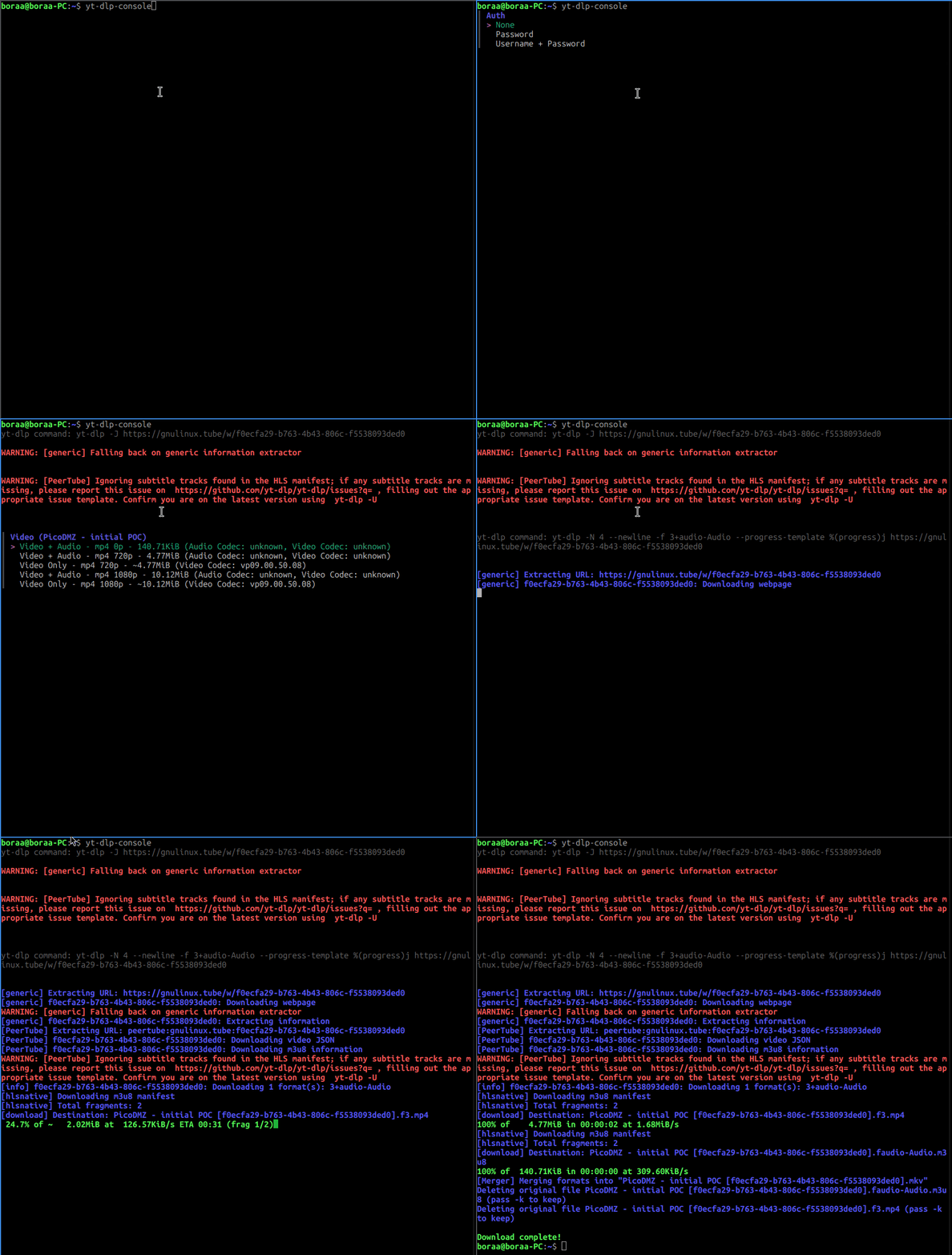
The full interactive download flow in action
The prompts walk you through each step in order:
- URL — paste in the video link
- Authentication — choose None, Password, or Username + Password; if you pick an auth method, you’ll be prompted for the credentials
- Video format — yt-dlp queries the URL for available formats and presents them as a navigable list; you arrow through and pick one
- Audio format — if your chosen video format doesn’t include an audio stream, you’ll get a second list to select an audio format to merge in
- Download — yt-dlp runs with the constructed arguments and streams its progress output directly to your terminal
Configuring settings
yt-dlp-console config
This opens an interactive config screen where you can set:
- yt-dlp command path — useful if yt-dlp isn’t on your
PATHor you have multiple versions (defaults toyt-dlp) - Concurrent fragments (
-N) — controls how many fragments are downloaded in parallel for fragmented streams; range is 1–32 (defaults to 4)
Settings are saved to:
- Linux / macOS:
~/.config/yt-dlp-console/config.json - Windows:
%APPDATA%\yt-dlp-console\config.json
Under the Hood
The project is written in Go and leans on a few libraries from Charm. Here’s how the pieces fit together.
Code Structure
The project is split into two top-level packages:
cmd/
  root.go       — root Cobra command + download flow
  config.go     — config subcommand
  forms.go      — Huh FormProvider interface and implementations
  update.go     — auto-update command
internal/
  appconfig/    — config struct, load/save as JSON
  console/      — styled terminal output (Error, Success, Info, Muted…)
  ytdlp/        — yt-dlp client, subprocess executor, argument builder
main.go
The cmd package owns the user-facing commands and form interactions. The internal/ytdlp package handles everything yt-dlp related — building arguments, invoking the process, and piping its output back to the terminal.
Cobra — Command Structure
Cobra is the de facto standard for Go CLIs — the same framework behind kubectl, Docker CLI, GitHub CLI, and Hugo. In yt-dlp-console, the root command runs the download flow and subcommands (config, update) are registered in their respective init() functions:
var rootCmd = &cobra.Command{
    Use:   "yt-dlp-console",
    Short: "Interactive CLI for downloading videos using yt-dlp",
    Run: func(cmd *cobra.Command, args []string) {
        config := appconfig.Get()
        client := ytdlp.NewYtDlpClient(newYtdlpExecutor(config), config)

        ctx, cancel := context.WithCancel(context.Background())
        defer cancel()

        if err := runDownloadFlow(ctx, client, defaultForms); err != nil {
            console.Error("%v", err)
            return
        }
        console.Success("Download complete!")
    },
}

func init() {
    rootCmd.AddCommand(configCmd)
    rootCmd.AddCommand(updateCmd)
}
Running yt-dlp-console with no arguments goes straight into runDownloadFlow. Subcommands like yt-dlp-console config are handled separately, keeping each concern cleanly isolated.
Huh — Interactive Forms
All the interactive prompts live behind a FormProvider interface in cmd/forms.go. This makes it straightforward to swap in a fake implementation for tests:
type FormProvider interface {
    Input(title string, validate func(string) error) (string, error)
    InputPassword(title string) (string, error)
    Select(title string, options []string) (string, error)
    Confirm(title, description string) (bool, error)
}
The real implementation wraps each Huh field type. Input accepts an optional validation function that Huh calls on every keystroke:
func (RealFormProvider) Input(title string, validate func(string) error) (string, error) {
    var val string
    f := huh.NewInput().Title(title).Value(&val)
    if validate != nil {
        f = f.Validate(validate)
    }
    return val, runHuh(f)
}
Password fields use EchoModePassword so the input is hidden:
func (RealFormProvider) InputPassword(title string) (string, error) {
    var val string
    err := runHuh(huh.NewInput().
        Title(title).
        EchoMode(huh.EchoModePassword).
        Value(&val))
    return val, err
}
Select builds its options dynamically from a []string — in practice this is the list of video or audio formats returned by yt-dlp:
func (RealFormProvider) Select(title string, options []string) (string, error) {
    var val string
    err := runHuh(huh.NewSelect[string]().
        Title(title).
        Options(huh.NewOptions(options...)...).
        Value(&val))
    return val, err
}
Confirm is used for yes/no decisions with custom labels:
func (RealFormProvider) Confirm(title, description string) (bool, error) {
    var val bool
    err := huh.NewConfirm().
        Title(title).
        Description(description).
        Affirmative("Yes").
        Negative("No").
        Value(&val).
        Run()
    return val, err
}
One small but important detail: after each Huh form completes it leaves the cursor on the prompt line in linux. A \r\x1b[K escape sequence clears that line before the next output is printed:
func runHuh(f interface{ Run() error }) error {
    err := f.Run()
    fmt.Print("\r\x1b[K")
    return err
}
In the actual download flow, validation is attached to the URL input to catch empty values and malformed URLs before yt-dlp is ever called:
videoUrl, err := forms.Input("Video Url", func(s string) error {
    if len(strings.TrimSpace(s)) == 0 {
        return errors.New("video url is required")
    }
    if !isValidURL(s) {
        return errors.New("video url should be valid")
    }
    return nil
})
yt-dlp Integration — Subprocess and Streaming
The internal/ytdlp package handles yt-dlp in two distinct modes depending on what’s needed.
Format listing uses buffered output. yt-dlp’s -J flag dumps all video metadata as JSON, which is captured into a bytes.Buffer and unmarshalled into a VideoData struct. While the process runs, Huh’s spinner component wraps the wait:
func (r YtdlpExecutorReal) Execute(ctx context.Context, cmd *YtDlpCommandArgs,
    cmdDesc string, stdout *bytes.Buffer, stderr *bytes.Buffer) error {

    execCmd := exec.CommandContext(ctx, r.config.YtDlpCommand, cmd.BuildArgs()...)
    execCmd.Stdout = stdout
    execCmd.Stderr = stderr

    return spinner.New().
        Title(cmdDesc).
        ActionWithErr(func(ctx context.Context) error {
            return execCmd.Run()
        }).
        Run()
}
Download streaming works differently — buffering would mean the user sees nothing until the download finishes. Instead, StdoutPipe and StderrPipe are used to get live readers, and the process is started with Start() rather than Run():
func (r YtdlpExecutorReal) ExecuteWithStreams(ctx context.Context,
    cmd *YtDlpCommandArgs) (io.Reader, io.Reader, error) {

    execCmd := exec.CommandContext(ctx, r.config.YtDlpCommand, cmd.BuildArgs()...)
    stdout, _ := execCmd.StdoutPipe()
    stderr, _ := execCmd.StderrPipe()
    err := execCmd.Start()
    return stdout, stderr, err
}
Back in the client, stderr is consumed in a goroutine so it never blocks stdout. Stdout lines are parsed as JSON — yt-dlp is invoked with --progress-template "%(progress)j" so each progress update arrives as a JSON object. Parsed lines are printed in-place using a carriage return, giving a live updating progress display:
go func() {
    defer close(done)
    for stderrScanner.Scan() {
        console.Error("%s", stderrScanner.Text())
    }
}()

for stdoutScanner.Scan() {
    line := stdoutScanner.Text()
    if json.Valid([]byte(line)) {
        var result DownloadResult
        if err := json.Unmarshal([]byte(line), &result); err == nil {
            console.SuccessSameLine("\r%s\x1b[K", result.DefaultTemplate)
        }
    } else {
        console.Info("%s", line)
    }
}
One more thing worth noting: credentials are never logged. The argument builder has a BuildArgsMasked() method that replaces password values with ****** for any debug output, while BuildArgs() produces the real arguments passed to the process.
Get Started with yt-dlp-console
If you use yt-dlp occasionally and find yourself reaching for the documentation every time, give yt-dlp-console a try. It won’t teach you any new yt-dlp flags — that’s the whole point.
The project is open source under the MIT license. If you run into a bug or want to see a feature added, issues and PRs are open.