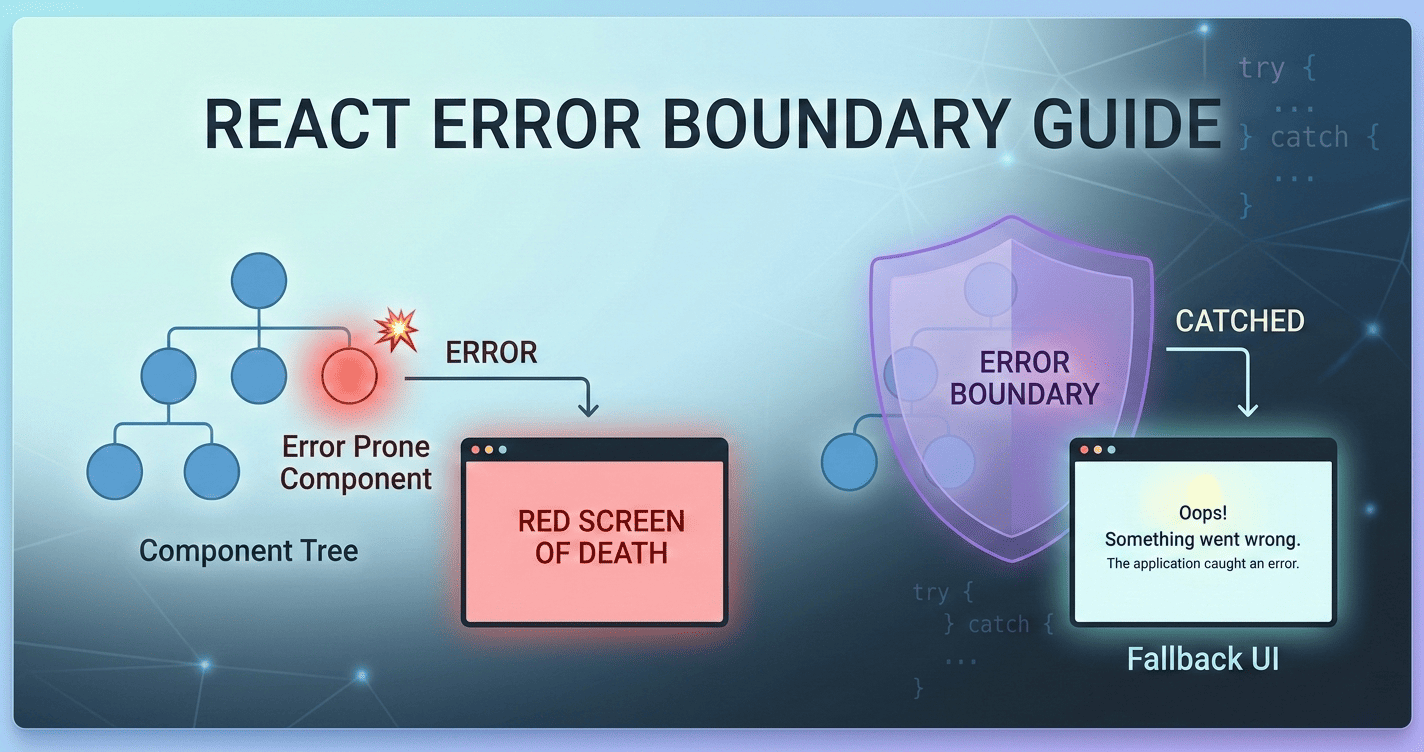
When your React application crashes, the default behavior is brutal: the entire component tree unmounts and the user sees a blank white screen.
Error Boundaries are the mechanism React provides to contain these crashes and show meaningful fallback UI instead. This guide covers how rendering errors work, what Error Boundaries can and cannot catch, and how to implement them in a production-ready way.
🚀 What you’ll learn:
- The difference between rendering errors and runtime errors
- Why
try/catchinside a component cannot stop a child crash- How to implement a class-based React Error Boundary from scratch
- How to use the
react-error-boundarylibrary for a functional-component workflow- When and where to place Error Boundaries in your component tree
Where to Place Error Boundaries in React App
A well-structured Error Boundary strategy mirrors your component hierarchy. Think of it as a layered safety net:
       [ App Root ]
             │
    ▼────────┴────────▼
[ Global Error Boundary ]
             │
      [ Main Layout ]
             │
    ┌────────┴────────┐
    ▼                 ▼
[ API Boundary ]   [ Logic Boundary ]
    │                 │
[ Data Fetching ]  [ Form Validation ]
The diagram above shows a three-tier Error Boundary strategy: a global root boundary catches any unexpected crash, feature-level boundaries isolate specific sections (such as API widgets or form logic), and targeted boundaries ensure a crash in one area never takes down the rest of the page.
- Global Layer: An
ErrorBoundaryat the root to catch unexpected JS crashes. - Feature Layer: Local
ErrorBoundarywrappers around specific sections. For example, if aRecommendationWidgetin a sidebar crashes, you may want to show a small inline error message there rather than taking down the entire page. The rest of the UI stays fully functional.
Understanding What Error Boundaries Can Catch
Before implementing Error Boundaries, you need to understand what kinds of errors they can actually intercept — and equally important, what they cannot. Not all errors that occur inside a component file are created equal. React distinguishes between errors that happen during rendering and errors that happen everywhere else.
Rendering Errors
A rendering error occurs during the Render Phase — the moment React calls your function components to determine what the UI should look like. If your code throws an error here, React cannot calculate the next state of the UI.
When a rendering error is not caught by an Error Boundary, React unmounts the entire component tree, resulting in a blank white screen for the user. Because React aims for consistency, it applies an “all or nothing” approach to prevent showing corrupted or partial data.
Common Causes
- Accessing properties of
undefined: e.g.,{user.profile.name}whenuser.profilehasn’t loaded. - Mapping over non-arrays: e.g.,
data.map(...)whendataisnull. - Invalid return values: Returning a plain object instead of a valid JSX element or
null.
The “Golden Rule” of Rendering Errors
React works in two distinct steps:
- The Render Phase: React calls your function to create a Virtual DOM (a plain JS object). This is where rendering errors happen.
- The Commit Phase: React takes that object and applies it to the real browser DOM.
If Step 1 fails, React never reaches Step 2. The browser is left with nothing to display because the “blueprint” was never finished.
- If the JavaScript engine stops while describing the Virtual DOM, it is a Rendering Error — and an Error Boundary will catch it.
- If the JavaScript engine stops while executing code outside React’s managed rendering loop (event handlers, async callbacks, timers, Promises), it is a Logic/Runtime Error — and an Error Boundary will not catch it. The error happens after the UI has already been described, so the rest of the application remains functional.
Rendering Error Examples
Property Access on Null/Undefined (In Body):
function Profile({ user }) {
  // If user is null, the app crashes instantly upon rendering
  return <div>{user.name}</div>;
}
Manual Throws (In Body):
if (shouldCrash) {
  throw new Error("Crashing during the render phase!");
}
Synchronous Errors in useEffect (React 19+):
Version note: This behaviour changed in React 19. In React 16–18, a synchronous throw inside
useEffectwould crash the app without triggering the Error Boundary. From React 19 onward, it is properly intercepted.
useEffect(() => {
  // React 19+ catches this and triggers the Error Boundary
  throw new Error("Effect Crash");
}, []);
Dynamic Throws (In Body):
function Component() {
  const [hasError, setHasError] = useState(false);

  if (hasError) {
    // STEP 2: Now it's a Rendering Error (Caught by Error Boundary)
    throw new Error("The UI is now broken.");
  }

  return (
    // STEP 1: The click itself is just a Runtime Action
    <button onClick={() => setHasError(true)}>
      Trigger Crash
    </button>
  );
}
Runtime Error Examples
These errors will not trigger an Error Boundary:
Synchronous Event Handlers:
// The console turns red, but the UI does NOT change
<button onClick={() => { throw new Error("Click Error"); }}>
  Click Me
</button>
Asynchronous Data Fetching/Saving:
const handleSave = async () => {
  const response = await fetch('/api/save');
  if (!response.ok) {
    // This is a logic error; it won't trigger an Error Boundary
    throw new Error("Save failed");
  }
};
Asynchronous Operations inside useEffect:
useEffect(() => {
  const handleSave = async () => {
    const response = await fetch('/api/save');
    if (!response.ok) {
      // This is a logic error; it won't trigger an Error Boundary
      throw new Error("Save failed");
    }
  };
}, []);
Timers and Callbacks:
useEffect(() => {
  setTimeout(() => {
    // This crashes the background thread, but not the UI
    throw new Error("Timeout Error");
  }, 1000);
}, []);
Why try/catch in a Return Statement Doesn’t Work
You cannot wrap a component’s return statement in a try/catch to stop a child crash. Rendering is declarative — the error doesn’t happen when you define the component, but when React invokes it later (after the parent has already finished).
function ParentComponent() {
  // ❌ This try/catch will NOT catch the error from ChildComponent
  try {
    return (
      <section>
        <h1>My App</h1>
        <ChildComponent />
      </section>
    );
  } catch (error) {
    return <div>Something went wrong!</div>;
  }
}

function ChildComponent() {
  // This error happens during the "Render Phase".
  // React calls this function AFTER ParentComponent has already returned.
  // The Parent's try/catch is already finished and gone!
  throw new Error("I crashed the whole app!");

  return <div>I am a child</div>;
}
So rendering errors are real, they will crash your UI, and neither try/catch nor any other JavaScript construct inside a component can stop them. This is exactly the gap that Error Boundaries fill.
Implementing a Class-Based Error Boundary
An Error Boundary is a special component that catches rendering errors in its child component tree and displays fallback UI instead of the crashed subtree. Introduced in React 16, Error Boundaries are the official mechanism for containing render-phase crashes. For the full specification, see the official React documentation on Error Boundaries.
Where to Place Error Boundaries
- Top-Level (Global Safety Net): Wrap
<App />inmain.jsxas the ultimate failsafe. - Layout or Route Level: Wrap specific routes or layout sections (works well with React Router).
- Component or Widget Level: Wrap individual high-risk or isolated components.
- Iterative/List Level: Place an Error Boundary inside a
.map()to isolate per-item crashes.
Class-Based React Error Boundary Implementation
Functional components cannot currently be Error Boundaries. Error Boundaries rely on two specific lifecycle methods — getDerivedStateFromError and componentDidCatch — which have no equivalent in the Hooks API yet. While Hooks cover almost all lifecycle use cases, the underlying architecture for catching render-phase errors hasn’t been “hookified” by the React team.
Here is a full class-based implementation:
import React from 'react';

class ErrorBoundary extends React.Component {
  constructor(props) {
    super(props);
    this.state = { hasError: false };
  }

  // 1. Called during the Render Phase. Returns new state to trigger fallback UI.
  static getDerivedStateFromError(error) {
    return { hasError: true };
  }

  // 2. Called during the Commit Phase. Use it for logging side effects.
  componentDidCatch(error, errorInfo) {
    console.error("Uncaught error:", error, errorInfo);
    // Example: logToService(error, errorInfo);
  }

  render() {
    if (this.state.hasError) {
      return (
        <div style={{ padding: '20px', border: '1px solid red', backgroundColor: '#fff0f0' }}>
          <h2>Something went wrong.</h2>
          <button onClick={() => window.location.reload()}>Reload Page</button>
        </div>
      );
    }

    return this.props.children;
  }
}

export default ErrorBoundary;
How the lifecycle flow works:
getDerivedStateFromError— Called during the Render Phase. Beingstatic, it has no access to the component instance. Its sole job is to return the new state that triggers a re-render with the fallback UI.componentDidCatch— Called during the Commit Phase. This is where you perform side effects such as sending the error stack trace to your analytics or logging server.
You can now wrap any part of your app:
function App() {
  return (
    <div>
      <Header />

      {/* If UserProfile crashes, Sidebar and Header remain functional */}
      <ErrorBoundary>
        <UserProfile />
      </ErrorBoundary>

      <Sidebar />
    </div>
  );
}
The react-error-boundary Library
React still requires Class Components for custom Error Boundary logic. However, the react-error-boundary package gives you a fully functional-component workflow.
import { ErrorBoundary } from "react-error-boundary";

function Fallback({ error, resetErrorBoundary }) {
  return (
    <div role="alert">
      <p>Something went wrong:</p>
      <pre style={{ color: "red" }}>{error.message}</pre>
      <button onClick={resetErrorBoundary}>Try again</button>
    </div>
  );
}

function MyComponent() {
  return (
    <ErrorBoundary
      FallbackComponent={Fallback}
      onReset={() => {
        // Reset the state of your app so the error doesn't happen again
      }}
    >
      <ComponentThatMightCrash />
    </ErrorBoundary>
  );
}
react-error-boundary is the industry standard because it lets you stay within the world of functional components and hooks. It also ships several advantages over a hand-rolled class component:
A. Built-in Reset Logic
In a standard class-based Error Boundary, clearing the error state to “try again” is manual and error-prone. This library provides resetErrorBoundary, which clears the error state and re-mounts the children automatically.
B. useErrorBoundary Hook
This hook lets you manually trigger the error boundary from inside your functional components — ideal for failed API calls that happen outside the render phase:
const { showBoundary } = useErrorBoundary();

// Later in an event handler or useEffect:
if (apiResponse.status === 500) {
  showBoundary(new Error("Server is down!"));
}
C. resetKeys
Pass an array of dependencies to the boundary. If any value changes, the boundary automatically resets itself — no manual wiring required:
<ErrorBoundary resetKeys={[userId]} FallbackComponent={Fallback}>
  <UserStats userId={userId} />
</ErrorBoundary>
This is particularly powerful when navigating between users or switching contexts: the moment userId changes, the previous error is cleared and the component re-mounts fresh.
Class-Based vs. react-error-boundary: Quick Comparison
| Feature | Class-Based (Manual) | react-error-boundary |
|---|---|---|
| Reset logic | Manual (setState) | Built-in resetErrorBoundary |
| Hook support | ❌ Not available | ✅ useErrorBoundary hook |
| Bridge runtime errors | Not possible natively | ✅ showBoundary() |
| Auto-reset on state change | Not possible natively | ✅ resetKeys prop |
| Boilerplate | Higher | Lower (declarative) |
| Recommended for | Learning / full control | Most production apps |
Conclusion
Here is a summary of what we covered in this guide:
- Rendering errors vs. runtime errors — An error is a rendering error only if it is thrown while React is describing the Virtual DOM (the Render Phase). Errors in event handlers, async functions, timers, and Promises are runtime errors that Error Boundaries cannot intercept.
try/catchis not a substitute — Because React calls child component functions after a parent has already returned, a parent’stry/catchblock is already out of scope when the child crashes. There is no standard JavaScript mechanism to stop this from within a component.- Error Boundaries are the answer — They are special class components that sit in the component tree and catch any rendering error thrown by their descendants, displaying fallback UI instead of crashing the whole page.
react-error-boundaryis the pragmatic choice — For most applications, thereact-error-boundarylibrary removes the need to write a class component yourself, and adds first-class features likeresetErrorBoundary, theuseErrorBoundaryhook for bridging runtime errors into the boundary, andresetKeysfor automatic recovery on state changes.
Frequently Asked Questions
Can React Error Boundaries catch async errors?
No. Error Boundaries only intercept errors thrown during the Render Phase (while React is building the Virtual DOM). Errors inside async functions, Promise chains, setTimeout, or event handlers are runtime errors and are not caught. Use the showBoundary() function from the react-error-boundary library to manually forward these errors into the boundary.
Do Error Boundaries work with React Hooks?
Error Boundaries themselves must still be class components because they rely on getDerivedStateFromError and componentDidCatch, which have no Hook equivalents. However, the react-error-boundary library wraps this complexity so you can use Error Boundaries entirely from within functional components and hooks.
What is the difference between getDerivedStateFromError and componentDidCatch?
getDerivedStateFromError is called during the Render Phase and returns new state to trigger a re-render with fallback UI. componentDidCatch is called during the Commit Phase (after the DOM has been updated) and is the correct place for side effects such as logging to an error reporting service.
When should I write my own Error Boundary instead of using react-error-boundary?
If you need highly custom fallback logic not covered by the library’s API, or if you are working in a codebase that already has a well-tested class-based boundary, maintaining your own is reasonable. For the vast majority of applications, react-error-boundary is the simpler and more maintainable choice.
Can I have multiple Error Boundaries in one React app?
Yes, and it is strongly recommended. Nesting Error Boundaries at different levels — global, layout, and component — means a crash in one isolated section never takes down the rest of the page. Think of them as circuit breakers: the tighter the boundary, the more surgical the fallback.